Why SMBs Should Use Veeam with Synology or QNAP NAS for Backup
Keep your Synology or QNAP NAS and build a recovery-ready Veeam backup design: immutable copies, offsite protection, application recovery and tested restores.
Category: Cloud & Backup · Published: 2026-11-29 · 10 min read · Author: ZM Technologies Team
Your NAS stores backups. Veeam makes sure you can recover.
A Synology or QNAP NAS is a useful investment a small or medium business can make for storage. Many SMBs also use it as their only backup: the NAS's built-in app copies PCs, servers and file shares to the box every night, and the job is marked “done”.
The problem shows up on the worst day. Ransomware encrypts the file server and then reaches the NAS with a stolen admin password. A server dies and the restore takes a whole day. An auditor asks for proof that backups have been tested, and there is none. These are illustrative failure scenarios, not customer incidents or promised recovery times.
The answer is not to throw the NAS away. It is to put Veeam Backup & Replication in charge of supported backup and recovery workloads, and keep the NAS as local storage inside a proper 3-2-1-1-0 design. This guide is specifically about Veeam backup with NAS: when built-in NAS backup is a reasonable starting point, and what changes when business recovery needs more protection.
Watch: Veeam + NAS explained (4 min)
Watch Veeam + NAS Backup for SMBs: Why Synology or QNAP Backup Alone Isn't Enough on YouTube
What Synology and QNAP backup apps do well, and where they stop
Synology Active Backup for Business and QNAP's backup apps, such as Hyper Data Protector and NetBak Replicator, are genuinely useful. On supported models, included backup apps can avoid a separate software licence purchase. Check the exact model, application, supported workload and current entitlement before relying on that assumption.
Their strengths include scheduled automatic backups of supported Windows PCs, file servers and virtual machines; deduplication where supported; a simple web console; and file-level and full-machine restores. NAS snapshots add another recovery option, including immutable snapshots on supported newer models. Capabilities vary between apps and models, so a Synology vs Veeam or QNAP backup vs Veeam comparison should start with your actual workloads rather than brand names alone.
Where a NAS-only design can stop:
- One box does everything. If the backup software, catalogue and data all live on the same NAS, a NAS failure or compromised administration can put both the copies and the ability to restore at risk. Supported immutable snapshots help, but require verified configuration and independent recovery access.
- Vendor dependence. Built-in apps are tied to their vendor's supported hardware and offsite options.
- Application recovery varies. Restoring a single mailbox, SQL database or Active Directory object needs a suitable application-aware recovery workflow.
- Restore proof may be manual. A successful copy job does not automatically demonstrate that a server and its application can start from that backup.
- Multi-site operation needs attention. Review central monitoring, ownership and escalation rather than assuming each NAS's dashboard is enough.
- Recovery can involve copying data back. Large restores can take hours, depending on the data, storage and network.
What Veeam adds on top of the NAS
- Immutable backups against ransomware. A supported Hardened Linux Repository or object storage with Object Lock protects eligible backups against modification or deletion during the configured lock period, including against compromised backup administration. A normal NAS share does not become immutable simply because Veeam writes to it. Protect infrastructure administration and keep an independent copy.
- Application-aware recovery. With the appropriate product, licence and supported backup, restore an email, mailbox, SQL database, Active Directory user or SharePoint item instead of rebuilding the whole source just to recover one item.
- Instant Recovery. Supported servers or VMs can run directly from backup while the full restore runs in the background. Recovery can begin within minutes, but storage performance, dependencies and workload support determine the actual result.
- SureBackup. Veeam can boot supported machine backups in an isolated lab and check that servers and applications start, producing a report. It does not test-boot every NAS file-share or Microsoft 365 copy; those need appropriate restore tests.
- Offsite copy. Veeam Cloud Connect sends eligible backup copies to a Veeam Cloud Service Provider's environment. Offsite location and immutability are separate properties; confirm protection and recovery access for the selected service.
- Broad workload coverage. The Veeam portfolio covers VMware, Hyper-V, Nutanix AHV, physical Windows and Linux servers, NAS file shares, Microsoft 365 and cloud workloads. Veeam Backup for Microsoft 365 is a separate product; supported products and consoles must be included in the design rather than promised as one universal job.
- Hardware freedom. Retain a suitable Synology or QNAP NAS, use a Dell or HPE server, or add supported cloud storage. Compatibility and repository requirements still apply.
- Monitoring and reports. Veeam ONE supplies monitoring and reporting for supported infrastructure within its configured scope.
For implementation and ongoing operation, see our managed Veeam Backup as a Service and Microsoft 365 backup service. These explain the service scope; this article focuses on what to change when the NAS is currently your whole recovery plan.
NAS only vs Veeam + NAS
| What matters | NAS built-in backup only | Veeam + NAS managed by ZM |
|---|---|---|
| Software licence | Included apps on supported models; check entitlement | Veeam licence per protected workload or managed monthly BaaS |
| Where backups live | Often one NAS, sharing the software's failure domain | Local NAS, hardened repository and independent offsite copy |
| Ransomware with stolen admin password | Mutable backups and snapshots may be at risk; supported immutable snapshots need validation | Eligible immutable copies resist deletion during their lock period; secure administration remains essential |
| Offsite copy | Second NAS or supported vendor cloud workflow | Veeam Cloud Connect to ZM's VCSP environment for eligible copies |
| Restore a server | Copy data back; large restores can take hours | Supported Instant Recovery starts from backup; actual time depends on the environment |
| Restore one email or SQL database | Depends on the app and protected workload | Application-aware or item-level recovery with the appropriate Veeam product |
| Proof that restores work | Manual testing unless another verified workflow is provided | SureBackup for supported machine backups plus workload-specific restore tests |
| Workloads covered | Supported PCs, file servers and VMs, depending on app and model | Supported VMs, physical servers, NAS shares, Microsoft 365 and cloud via the relevant products |
| Hardware choice | Vendor-specific app requirements | Supported repositories across storage vendors |
| Audit evidence for ISO 27001, SOC 2 and TISAX | Job logs plus whatever restore evidence the business maintains | Job history, protection settings, restore-test records and scoped reporting |
| Best fit | Small office with limited recovery needs and an independent offsite copy | Business-critical servers, plants and firms needing documented recovery controls |
Reference architecture and data flow for an SMB
ERP, AD, SQL, files
Veeam Agent
NAS and SMB data
Mail, OneDrive, Teams — separate Veeam Microsoft 365 backup
Scheduled backup jobs
Schedules, encrypts and moves supported backup copies; Microsoft 365 uses its own Veeam product and jobs.
Backup and backup copy jobs
On site; fast local restores
Immutable during its configured lock period
Offsite via Veeam Cloud Connect; protection configured separately
Treat this as a reference design, not a declaration that every workload writes identically to every destination. Confirm repository compatibility, licence coverage, retention, encryption-key custody, Cloud Connect protection and restore procedures before deployment. A Microsoft 365 backup needs its own supported product and repository design. Keep the NAS's storage administrator separate from everyday backup operations where practical.
The original business data and backup destinations must be counted carefully against the 3-2-1-1-0 and immutability guide. Extra copies are useful only if their failure domains and recovery access are genuinely independent. Replicating deletion or corruption to another box is not the same as preserving a protected recovery point.
Three real-world moments: with and without Veeam
These scenarios compare recovery approaches; they are not case studies or guarantees.
| Situation | NAS backup only | Veeam + NAS |
|---|---|---|
| Ransomware hits the file server and the NAS admin account | Mutable copies can be deleted or encrypted. Properly configured supported immutable snapshots may help, but the NAS remains a shared failure domain. | A separately protected immutable local copy and independent offsite copy offer recovery paths. Select a trusted restore point, scan supported restores for malware and coordinate safe reconnection. Cloud Connect alone does not guarantee an untouched copy. |
| An employee deletes an important mailbox or folder | Restore options depend on the backup app; recovering an entire machine or share can add work when item-level recovery is unavailable. | Recover the supported mailbox, email, folder or database using the relevant product and application-aware workflow. Validate the recovered item with its owner. |
| The main ERP or file server's hardware fails | Replacement hardware and a full copy-back restore can extend downtime. | Supported Instant Recovery runs the machine from backup while replacement and migration proceed. Test its dependencies and usable performance rather than assuming a fixed recovery time. |
Backup evidence for ISO 27001, SOC 2 and TISAX
Auditors ask for backup policy, retention, offsite protection and proof that restores are tested. ISO/IEC 27001:2022 Annex A control 8.13, Information backup, expects backups to be maintained and regularly tested in line with an agreed policy. SOC 2 availability and confidentiality considerations include documented backup, recovery testing and protection of backup data. TISAX assessment scope can include backup, recovery and protection against malware.
SureBackup reports for supported workloads, immutability settings, job history and Veeam ONE reports can contribute to that evidence. Retain the business owner's validation, exceptions and corrective actions alongside technical reports. ZM's ISO/IEC 27001:2022 Lead Auditor expertise helps map evidence to relevant controls; software reports do not themselves certify an organisation.
For practical operating questions, read the SMB server backup checklist and the managed BaaS guide. Neither replaces the NAS-specific failure-domain and repository decisions above.
How ZM Technologies delivers Veeam with your NAS
ZM Technologies is a Pune-based system integrator and managed IT services provider, trusted since 2012, and a Veeam Cloud Service Provider with a Veeam-certified team. We keep your suitable NAS and make it part of a managed, ransomware-ready backup service:
- Assess: inventory servers, PCs, NAS shares and Microsoft 365; identify data owners and downtime tolerance.
- Design: plan 3-2-1-1-0 around your Synology or QNAP, a supported hardened repository and an independent offsite copy, with the appropriate products for each workload.
- Deploy: configure Veeam, backup jobs, supported immutability, encryption and Cloud Connect to ZM's VCSP environment for the agreed India-hosted scope.
- Manage: monitor jobs daily, investigate failures and route alerts through our support desk under the agreed service scope.
- Prove: conduct scheduled restore tests and provide monthly reports, with application-owner validation and tracked exceptions.
Delivered as monthly Backup as a Service with scope agreed in the quotation. Bring your NAS model, protected workloads, used data and recovery priorities to a free backup assessment. Use the existing consultation process; no separate form or licence purchase is needed to start the discussion.
FAQs
Can Veeam use my existing Synology or QNAP NAS?
Yes. Veeam can use a supported NAS as a backup repository over SMB or NFS, or the NAS can host an iSCSI volume presented to a suitable repository server. Confirm the model, protocol and repository requirements. For ransomware protection, add a supported Hardened Linux Repository or immutable object storage alongside it; an ordinary NAS share is not a hardened repository.
Is Synology Active Backup for Business enough for a small business?
For a small office with a few PCs and a file server, it can be a reasonable start if the model and workloads are supported and you also keep an independent offsite copy. Once servers become business-critical, or audits and ransomware risk matter, Veeam adds supported immutability, tested restores and fast recovery options.
What is the 3-2-1-1-0 backup rule?
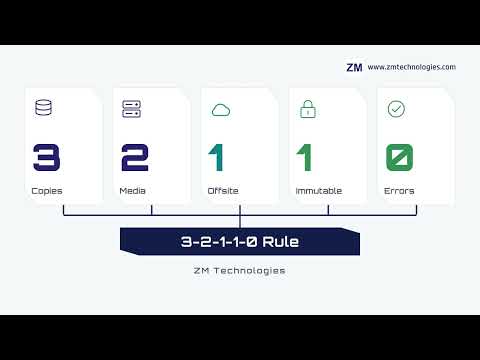
Keep 3 copies of data on 2 different media, with 1 copy offsite, 1 copy immutable or offline, and 0 errors after restore testing. Use automated verification where supported and workload-specific restore tests elsewhere; a successful backup job alone does not prove recovery.
Does Veeam back up Microsoft 365?
Yes. Veeam Backup for Microsoft 365 protects supported Exchange Online, SharePoint, OneDrive and Teams data. It is a separate Veeam product with its own supported backup and recovery configuration, not a Microsoft 365 job inside Veeam Backup & Replication.
Do I need to buy Veeam licences myself?
Not with ZM's agreed Backup as a Service arrangement. As a Veeam Cloud Service Provider, ZM delivers eligible Veeam workloads as a managed monthly service that includes monitoring and an offsite copy within the quoted scope. Confirm product coverage, retention, recovery access and exit arrangements before onboarding.
How fast can a server be recovered with Veeam?
With supported Instant Recovery, a VM can run directly from its backup within minutes. Actual times depend on storage speed, server size, workload support and application dependencies. Test a representative recovery before using it as your business recovery objective.